
Live Streaming crosslisted classes at DCE
How we produce Harvard campus classes for Extension and Summer by streaming from traditional classrooms to online students, with recording for asynchronous use.
What is a crosslisted course?
DCE offers a number of courses each semester which are being offered on campus at other Harvard University schools, that are filmed for the students signing up to take the class online through the Extension School. The catalog shows the format as “online only” and “asynchronous” since Extension students can watch the recording on demand. Usually, there is also an option to watch live as we film at class time.
Live Streaming vs. HELIX Classroom hyflex
Most non-crosslisted DCE courses that are offered with the option to attend on campus or online are held in specially equipped DCE classrooms, called HELIX (Harvard Extension Live Interactive eXperience) Classrooms. In these rooms, online students can be seen on large monitors in the classroom, and heard over the speakers, for full verbal and visual participation in class discussion.
However, the crosslisted classes held at other Harvard schools are usually in rooms which are not equipped with the HELIX system. Instead, a videographer sets up a field camera kit in the classroom and feeds the video into a Zoom webinar or meeting for live streaming and recording.

As the instructor on campus, you will not see or hear your online students while you are teaching in the classroom. The live stream allows online students to observe the classroom, but not to speak or turn on their camera.
By default, we use the “webinar” format for one-way live streams, so there are no microphone and camera buttons visible to students. If students have buttons as they do in a typical Zoom web conference, they can become confused and frustrated when an instructor appears to ignore them even though they are talking or raising their hand. In the webinar format, the student interface accurately reflects that they will not be seen or heard on campus.
If you are interested in more fully blending your online and campus cohorts using HELIX Classroom for real time discussion, please consult with the Classroom Production team well before the semester. In addition to pedagogical approach, we will need to consider the relevant student privacy policies of the crosslisted school(s), and whether you can meet in an appropriate HELIX Classroom equipped location at your intended class time.
Zoom Chat during live streaming
Although the online cohort during a live stream cannot be seen or heard on campus, they may choose to use the Zoom chat to communicate with each other and the course staff. If course staff are not available to monitor the Zoom chat, we recommend letting your students know what to expect, and the preferred way to share their thoughts and questions, such as a discussion platform in Canvas or at a separate section meeting.
Using breakout rooms during live streaming
Optionally, if your course includes small group discussion or active learning on campus, consider running a parallel discussion or activity in Zoom. This can be an effective strategy for student engagement, but does require an instructor or TA to run the activity in Zoom during class in real time, and still requires an equivalent activity for asynchronous students who are not online at class time.
If you intend to use breakout rooms during your live stream for online participation, please be sure that the Classroom Production team is aware of this need so that we set up your stream with full Zoom meeting capability instead of as a webinar. We will reach out to you before each semester begins to ask a number of setup questions, including this aspect.
Asynchronous participation
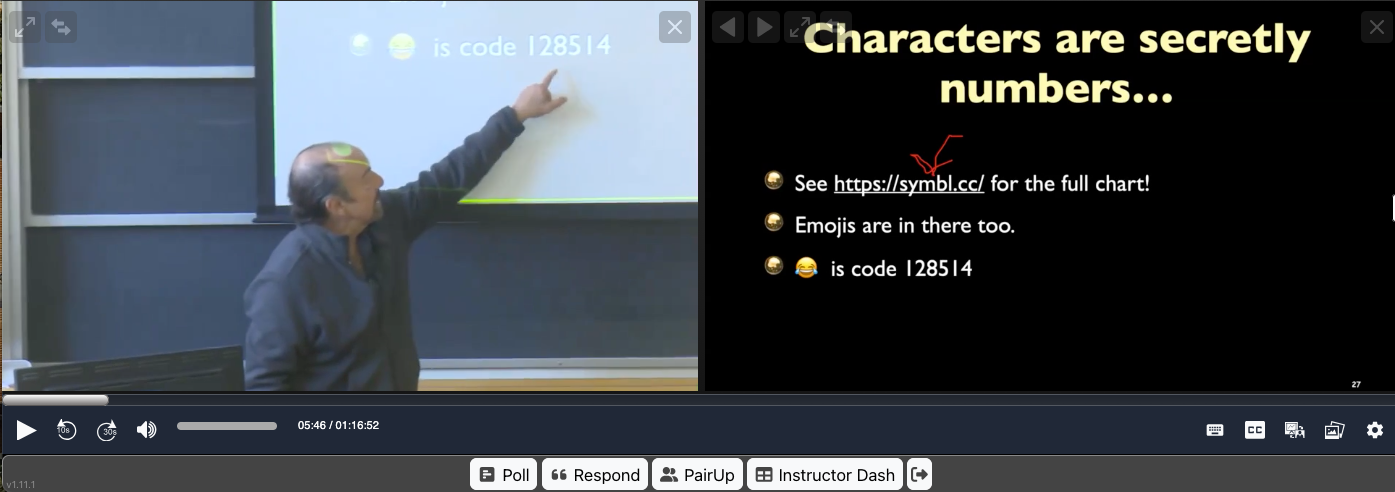
The Zoom webinar used to live stream is also recorded for students who will participate asynchronously instead of viewing the live stream at class time. For this course format, the recording is automatically ingested into the OpenCast video system and appears in Canvas on the Class Recordings tab.
Students view the recording in the Immersive Classroom player, and may participate by adding to the Zoom chat using Chat Plus, creating notes and bookmarks for their own use, or choosing to chat live with fellow students who happen to be viewing the same recording. As the instructor, you may ask Classroom Production to enable additional Immersive activities if you will use them, such as Respond and Pair Up.
If you would like to discuss including more Immersive Classroom activities for the asynchronous cohort in your crosslisted course, the Teaching and Learning teams are available for training and consultations.
Contact
To discuss proposing your Harvard University course as a crosslisted online offering through the Extension School, contact DCE Faculty Engagement and Academic Affairs at DCE_AcademicAffairs @fas.harvard.edu
For an individual orientation to the logistics and technology for teaching your approved crosslisted course with Harvard Extension School, contact Classroom Video Production and OpenCast Services at production @dce.harvard.edu
The Faculty Portal lists upcoming trainings in Immersive Classroom tools, or set up an individual consultation with a member of the Teaching and Learning team.
Article by Kriss Barnhart, Associate Director for Classroom Video Production and OpenCast Services, Harvard Division of Continuing Education, April 2026