
Why use a Gather shareable link?
What are secure shareable and breakthrough links in DCE Gather, and why instructors should use them.
Why use a Gather shareable link?
From time to time, you may want to distribute the direct link to a class meeting, such as in an email to your students, or an announcement. Some instructors even prefer to place this information in the public syllabus.
Unfortunately, Zoom bombing is a reality. Online tools crawl the web looking for unsecured Zoom sessions that bad actors can disrupt with annoying and offensive content. Even if this information is sent only to those enrolled, several message boards have groups dedicated to disrupting online classes when disgruntled or mischievous students give them your link information and class time. So how can we guard against Zoom bombing when the link to your class may be leaked, even by those who have it legitimately?
Instead of posting or sending a zoom.us link, meeting ID number, or passcode that anyone can use, Gather, the Canvas LTI built by DCE, includes a feature called “shareable links.” This feature uses Canvas authentication to securely direct enrolled students and course staff into your class meeting, and block those who are not associated with the course. Those already logged into the course’s Canvas site find themselves in the Zoom session immediately, and those who aren’t logged in yet at the time are directed through the Canvas login screen before proceeding to class.
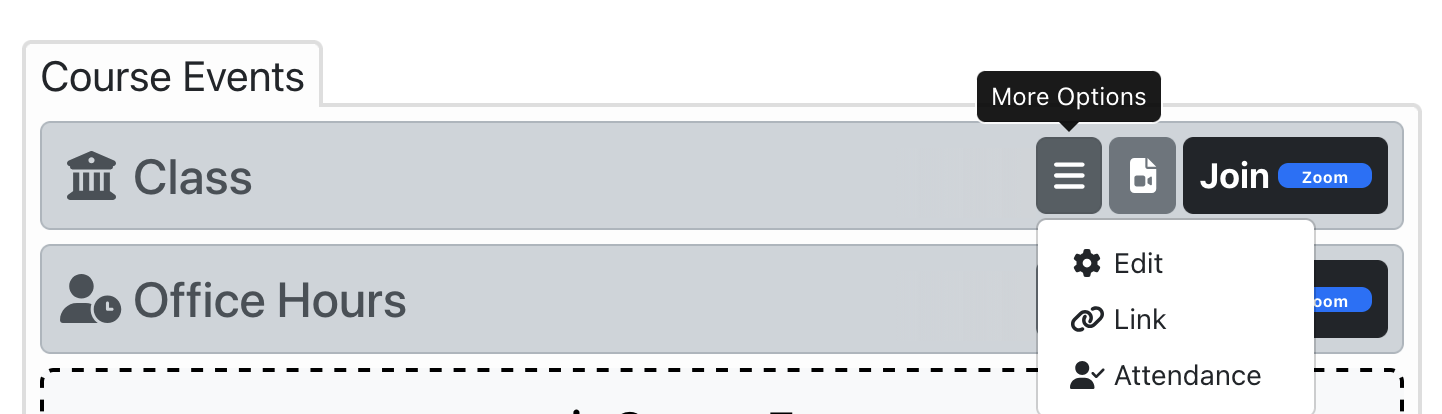
To find your secure shareable link, use the “More Options” menu button next to the event in Gather. Select “Link” in the dropdown, and copy the shareable link from the popup window that appears.
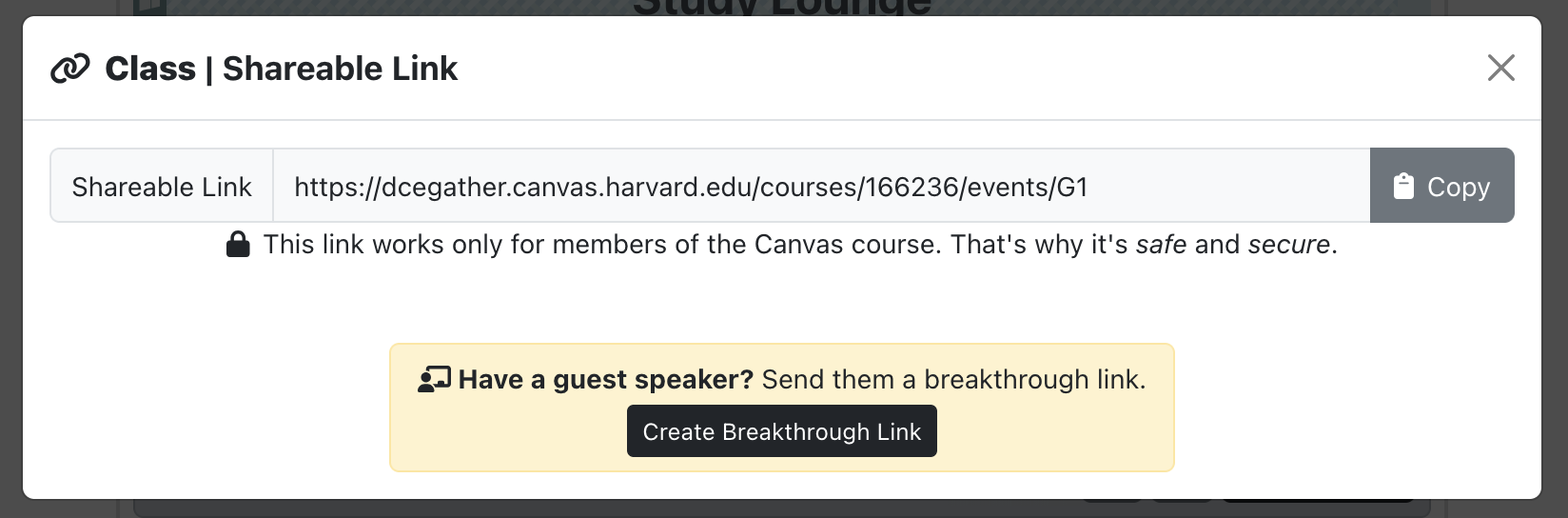
What is a breakthrough link and how is it different?
For authorized online guests such as remote guest speakers who are not able to log into your course Canvas site, there is a variation called a “breakthrough link,” which does not require a login for authentication. Breakthrough links are not secure and should be given only to individual trusted parties who will not share them with others. To mitigate the risk of not authenticating the person’s identity, breakthrough links are good only for a specific date, when the authorized guest will attend.
Since anyone could use them, breakthrough links must never be posted publicly or sent to persons not affiliated with the course or registered as a guest speaker with FEAA. Fortunately, unlike a raw zoom.us link, if a Gather breakthrough link is leaked, it can be revoked in the admin interface of Gather without changing the regular class link for all other students.
For assistance with remote guests in a campus room, contact the AV Services department for your classroom building. Breakthrough links are not always used for remote guests shown on screen in campus classrooms, as those guests may not be joining class via the same Zoom link that students use. In many cases, they will not even be in the same Zoom session as the online students. If your remote guest needs a breakthrough link, AV Services will provide one.
Contact
- For questions or assistance with Gather, contact DCE Web Conference Support at webconference@dce.harvard.edu
- For classroom AV Services in DCE buildings, including HELIX Classroom support for remote guests, contact brattlemedia@extension.harvard.edu
Article by Kriss Barnhart, Associate Director for Classroom Video Production and OpenCast Services, Harvard Division of Continuing Education, April 2026